

We recently published a blog post all about the Important KPIs to measure SEO Growth in which we included a video breaking down SEO, how it’s measured and how to boost rankings and monitor your growth.
Here’s the video in case you haven’t seen it.
Please note, since the production of this video and our initial blog post, Google has since updated Data Studio to Looker Studio and Universal Analytics to GA4. This has altered some of the applicable key metrics and, where possible, we have referenced that.
We thought we’d go even further. We’re not going to stop at telling you what KPIs to measure, but here’s how to measure them – quickly with a free Google Looker Studio template that specifically monitors SEO KPIs.
What is Google's Looker Studio?
Previously known as Google Data Studio, Google’s Looker Studio is a free software from Google that is customisable and provides reports and real-time dashboards full of whatever data set you choose.
You can use Google Looker Studio for monitoring AdWords performance, Meta ads reports, website metrics and so much more.

It integrates with many different brands of software and reporting tools and can be connected with a third party like Zapier to make non-integrated connections possible – like Meta.
If you have Google Analytics, Google AdWords and Google Search Console accounts, then Google’s Looker Studio is the perfect place to run reports and display data in easy to manage graphs and charts.
As such, it’s a popular choice among agencies and in-house marketing teams who want a great piece of software and want to use the budget somewhere else.
Google Looker Studio for tracking KPIs of SEO
As we mentioned above, you can connect Google Looker Studio with your Google Analytics and Google Search Console accounts and in doing so, you can use Looker Studio to create a dashboard or report that displays the KPIs we have mentioned in this post.
We’re talking stats like:
- Organic bounce rate
- Organic conversion rate
- Organic visibility
- Top Organic Keyword Rankings
When you create an account within Google Data Studio it does have some templates available, but this one is specifically tailored to track organic KPIs.
And we’ve provided space for your own analysis, whether this is for your clients or your bosses.
Feel free to make a copy for yourself and rebrand in your own style.
Free Google Looker Studio Template for Measuring SEO KPIs
To access our Google Data Studio Template for SEO KPIs visit this link.
We have provided a helpful breakdown and instructions on how to connect appropriate software to the dashboard and how to download this dashboard for your own use.
Make sure to make a copy of this dashboard by clicking on ‘more options’ in the hamburger menu and select ‘copy report’. Google will help you do the rest.
Now you can visualise how you have boosted rankings and grown your website’s traffic in one handy report.
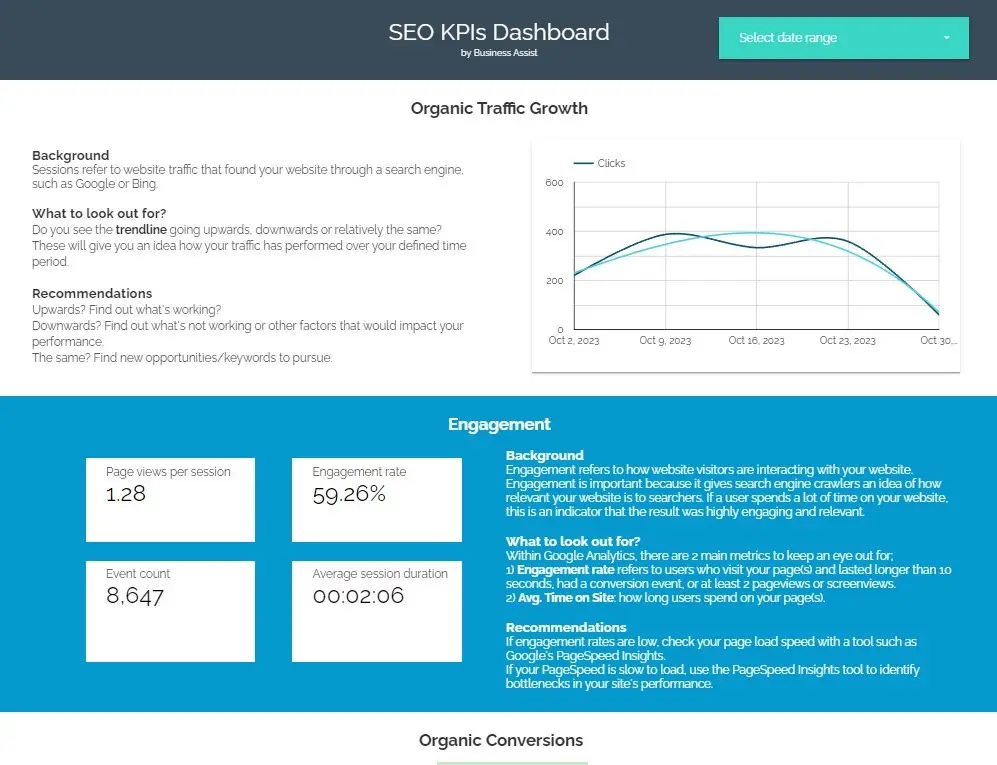
Measuring and reporting on SEO KPIs is essential to ensure you’re investing your time and budget correctly and growing profitable traffic to your website.
Our report can help, but if you need more help understanding SEO or want someone to manage it for you by taking the next step in your digital marketing, then Business Assist can help.


